
What looks like a “bad” record may simply have been checked for the wrong channel. Knowing how to clean a mailing list before sending starts with separating email contacts from postal addresses. Each requires different checks, and mixing them up can lead to avoidable bounces, wasted effort, or legitimate subscribers being removed.
Review your list before a campaign, but don’t treat cleanup as a reason to delete every record that raises a question. Duplicates, outdated details, inactive contacts, and unclear verification results all need different responses. A careful process helps distinguish invalid records from uncertain ones and supports better decisions about what to keep.
This guide lays out a repeatable pre-send workflow. You’ll learn how to organize records by channel, spot common data problems, handle ambiguous results, and prepare an audience for your campaign. Whether you’re sending email or planning direct mail, clean, relevant records help keep outreach focused. We Mail America supports targeted direct mail campaigns nationwide across all 50 states, where accurate audience information is one important part of preparation.
Key Takeaways
- Start with a protected copy of your list so you can review records without losing the original data.
- Learn how to clean a mailing list before sending by checking record history, duplicates, and email verification results before making changes.
- Choose manual review, platform checks, or third-party verification based on your list’s size and the level of uncertainty.
- Keep unsubscribed and confirmed invalid contacts suppressed, and review ambiguous results before deciding what to do.
- Match each record to the campaign channel it supports. Email checks don’t verify postal addresses for direct mail.
What Does It Mean to Clean a Mailing List Before Sending?
Email-list cleaning means reviewing contact records before a campaign to find and correct errors, remove duplicates, and separate invalid or suppressed addresses from records that need more review. The goal is a usable send file, not a guarantee of inbox placement. Mailbox providers and other factors influence whether a message reaches an inbox.
This is one practical application of Data cleansing, the broader practice of finding and correcting or removing inaccurate, corrupt, or irrelevant records. For marketers, even simple issues matter: a typo can make an address unusable, duplicate records can lead to repeated messages, and outdated contact information can waste sends or distort campaign reporting.
Which email-list problems should you look for?
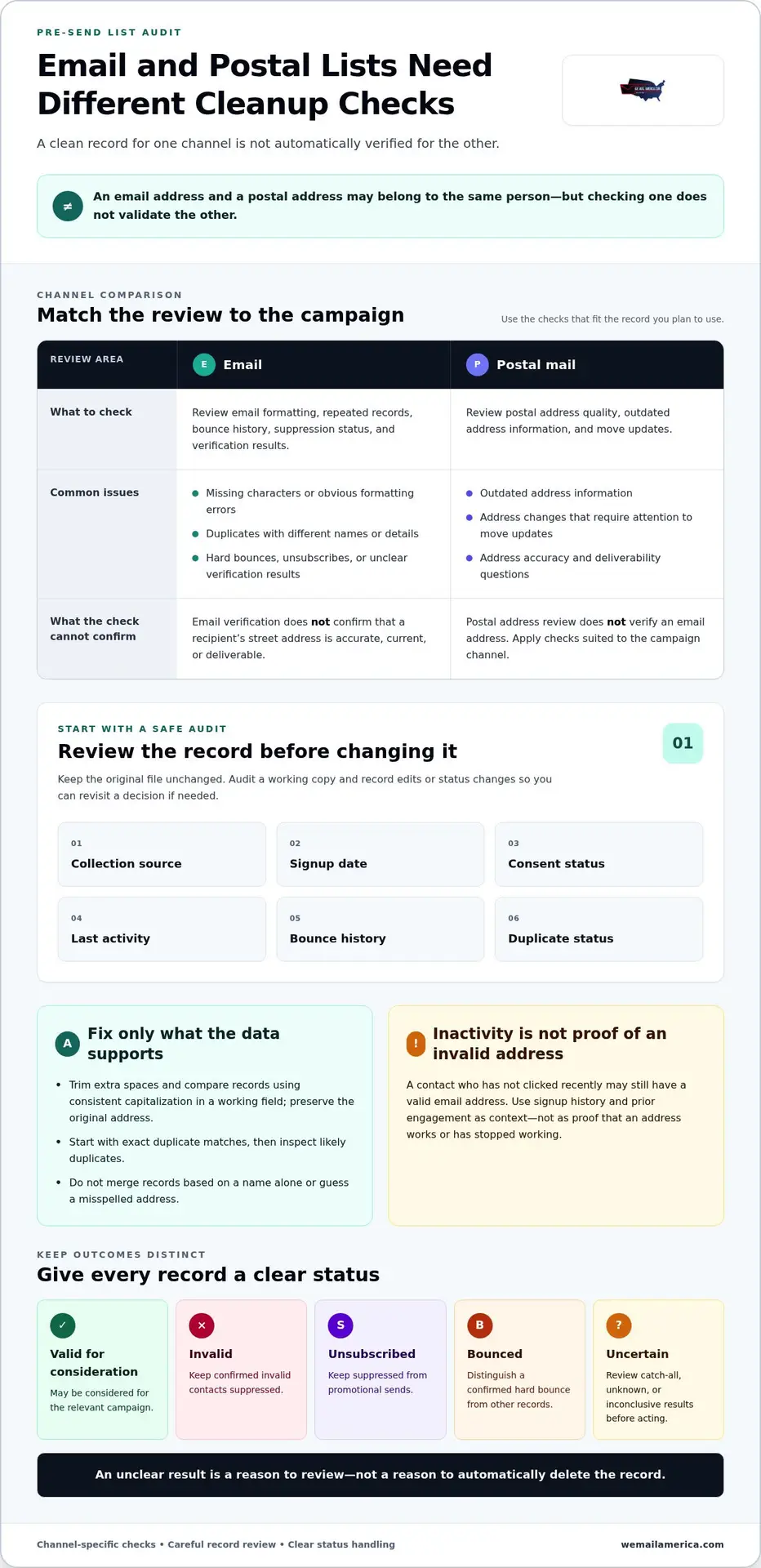
Review address formatting, repeated records, and domains that may affect delivery. A malformed address might be missing a character or contain an obvious formatting error. A duplicate may appear more than once under the same email address, sometimes with different names or other details. Don’t merge records automatically if you can’t establish which details are accurate.
Separate records with clear outcomes from those that are uncertain. A confirmed hard bounce is different from an address that needs another check. An unsubscribed contact is different again: the address may still exist, but it should remain suppressed from promotional sends. Keep these categories distinct so cleanup doesn’t accidentally put suppressed contacts back into a campaign file.
Low or absent engagement calls for review, not automatic deletion. Someone who hasn’t clicked recently may still have a valid address and may simply prefer to read without interacting. Inactivity alone doesn’t prove that an email address is invalid.
Email list hygiene versus postal address hygiene
Email verification checks email-related details. It doesn’t confirm that a recipient’s street address is accurate, current, or deliverable. Postal records need their own address-quality review, including attention to outdated address information and move updates. For that separate process, see the USPS Move Update: 2026 Guide for Mailers.
Keep the channels straight. An email record and a postal address may belong to the same person, but cleaning one doesn’t validate the other. When deciding how to clean a mailing list before sending, first identify whether the campaign will use email or physical mail. Then apply checks suited to that channel, and preserve uncertain records for review instead of treating them as confirmed errors.
Audit Your Mailing List: What to Check Before Choosing a Cleanup Method
Start with a protected copy of the original file. Keep it unchanged while you audit a working copy, and record edits or status changes. The original gives you a reference if a record is removed by mistake or a duplicate decision needs another look.
Before choosing a cleanup method, review each record’s collection source, signup date, consent status, last activity, bounce history, and duplicate status. These details help explain why an address may need attention. For example, a recent signup with no campaign activity is different from an older record with repeated bounce history.
Audit collection source, signup date, consent status, last activity, bounce history, and duplicate status before changing a record.
Find duplicates, typos, and malformed addresses
For comparison, trim extra spaces and use consistent capitalization in a separate working field, while preserving the original address. Start with exact matches. Then inspect likely duplicates, such as records with similar names but slightly different addresses. Don’t merge them based on a name alone. Confirm that the records represent the same contact and decide which details are supported by your data.
Correct only obvious, evidence-based formatting errors. A stray space is clear. Guessing which name or domain a misspelling was meant to represent is not. If reliable information doesn’t establish the correct address, flag it for review rather than silently changing it.
Assess old, inactive, or uncertain contacts
Use signup history and prior engagement as context, not as proof that an address works or has stopped working. Keep records with catch-all or unknown verification results in a separate uncertain group. Review them before acting instead of treating an inconclusive result as a confirmed failure.
Check platform suppression records before building the campaign file. Keep unsubscribed contacts suppressed, and distinguish them from hard-bounced addresses and records that still need review. For guidance on commercial email requirements and opt-out requests, consult the FTC’s CAN-SPAM Act compliance guide.
Use clear status groups so every record has a next step: valid for consideration, invalid, unsubscribed, bounced, or uncertain. This makes how to clean a mailing list before sending a consistent review process rather than a rushed round of deletions. Once the audit is complete, use the audience and channel to guide campaign planning. For a nationwide direct mail campaign, explore targeted campaign planning.
Manual Review, Email Verification, or Platform Checks: Which Approach Fits?
The right cleanup method depends on what you need to resolve. A manual pass can catch obvious errors. Your email platform may already hold useful bounce and unsubscribe history. A verification service can add technical checks, but its results still need interpretation. When considering how to clean a mailing list before sending, use the lightest method that answers the question, and don’t automatically delete unclear records.
| Approach | Effort | Scale | Ambiguity and data handling |
|---|---|---|---|
| Manual review | Hands-on | Best suited to small batches and obvious issues | Human judgment helps with context, but unclear records still need investigation. Work on a protected copy. |
| Platform checks | Usually low if records are already there | Useful for reviewing existing campaign history | Statuses depend on the platform’s available records and definitions. Check suppression data before exporting. |
| Third-party verification | Requires setup and review of returned results | Can process larger files in bulk | Results may include uncertain categories. Review data-security practices and integration fit before uploading contacts. |
When manual review or built-in platform checks may be enough
For a small list with a few visible problems, start manually. Fix clear spacing or formatting issues, and compare exact email matches. Don’t infer someone’s intended address from a typo. Your platform can also help surface recorded bounces, unsubscribes, and, depending on its features, duplicate entries. Preserve the source file, and investigate uncertain matches before changing them.
What third-party verification can and cannot tell you
Verification services may check whether an address follows expected syntax, whether its domain appears able to receive email, and whether mailbox-related signals suggest an address is usable. These are indicators, not promises of future delivery. An address can pass checks and still bounce later, while a tool may be unable to reach a firm conclusion.
Pay special attention to catch-all, role-based, and unknown results. A catch-all domain may accept messages without confirming whether a specific mailbox exists. Role-based addresses, such as a general department inbox, aren’t automatically invalid. Keep these statuses in a review group and weigh them alongside your own contact history. Don’t delete a potentially valid contact solely because a service labels its result uncertain.
Before uploading a contact file, review how the verification provider handles and protects data, and whether its workflow fits your systems. Don’t treat any single result as a definitive verdict. Use the output to guide review, then make record-level decisions based on the evidence you have.
How to Clean a Mailing List Before Sending: A Step-by-Step Workflow
A consistent workflow makes cleanup easier to repeat and reduces the chance of removing a contact by mistake. Keep the original file intact, base decisions on documented evidence, and build a separate send file from records appropriate for the campaign.
Prepare the source file and run checks
- Save a dated source copy. Export the list before making edits. Note where it came from and which audience the campaign is meant to reach.
- Standardize a working copy. Make fields consistent for comparison, such as trimming extra spaces around email addresses. Preserve original values so you can trace any change.
- Identify duplicates and obvious errors. Check exact email matches first. Review likely matches before merging, and correct only errors supported by reliable information.
- Use suitable checks. Review available platform history and, if appropriate for your process, verification results. Treat results as evidence to assess, not automatic instructions to delete.
- Sort by outcome. Separate confirmed problems from records that need human review. Keep catch-all and unknown results in an uncertain group until you can assess them.
Suppress, review, and validate the send file
Apply clear statuses carefully. Keep unsubscribed contacts suppressed according to your platform records. Keep confirmed invalid addresses and bounced contacts out of the send file, and don’t return suppressed records during a later export. Record why each status changed, especially when you act on a verification result.
Review uncertain contacts against their collection history and other available context. An inconclusive tool result isn’t enough to prove an address is invalid. If the evidence doesn’t resolve the question, leave the record out of the current send file while preserving it for further review. This makes how to clean a mailing list before sending a controlled decision process, not a one-click deletion exercise.
Before scheduling, inspect the final segment and send settings. Confirm that the selected audience matches the campaign, suppression rules remain in place, and links lead to the intended pages. Send a test message and review it on the devices or email clients available to your team. Check the audience selection again before launch. A clean test message won’t guarantee delivery, but it can catch setup mistakes before the campaign goes out.
Planning beyond email? Plan a targeted direct mail campaign with We Mail America, serving businesses across all 50 states.
After Email List Cleanup: Match the Audience to the Right Campaign Channel
Email cleanup prepares email records for email campaigns. It doesn’t verify street addresses or create a ready-to-mail postal file. Treat each channel as its own workflow, with separate contact fields, suppression rules, and quality checks. An email address marked valid doesn’t confirm that the person’s mailing address is current.
Keep email contacts and postal records in separate workflows
For postal outreach, review address information independently and prepare a mailing file for the campaign. Keep email engagement and bounce history in email records, and use postal address details and their own update checks for physical mail. Don’t assume a contact suppressed from email should automatically be excluded from every channel. Apply the audience and suppression rules for the specific campaign to the records intended for that send.
Choose the channel based on the audience, geographic coverage, message, and response you want. Email may fit a timely digital update. A physical mail piece can put a tangible message in someone’s hands. If geography matters, decide whether the campaign needs a defined target audience or broader coverage. Start with the campaign objective, not simply with which records passed an email check.
Plan a coordinated campaign with nationwide reach
We Mail America provides direct mail campaigns and digital advertising, including email campaigns, to customers across all 50 states. Direct mail campaign services can bring targeting, design, printing, and postage together. Businesses can plan the audience and channel as connected parts of a campaign while keeping email and postal record checks distinct.
Before launch, match the campaign message to the intended response. Consider whether recipients should visit a website, call, or take another clear next step. Then align the audience and geographic targeting with that objective. For guidance on postal campaign planning and audience coverage, explore Direct Mail Advertising Services for Business Growth and EDDM vs. Targeted Direct Mail: The 2026 Guide to Nationwide Marketing Strategy.
Good channel planning builds on careful list preparation. Knowing how to clean a mailing list before sending helps you separate email verification from postal address review, then choose the outreach that fits your campaign. Ready to plan a nationwide campaign? Submit an advertising inquiry.
Put Your Clean List to Work
A reliable pre-send process starts with a protected source file, a clear audit, and careful decisions about which records to suppress, review, or retain. Verification results can guide those decisions, but uncertain statuses deserve a closer look rather than automatic deletion. Keep email and postal records in separate workflows, since an email check doesn’t validate a street address.
That’s the foundation of how to clean a mailing list before sending: prepare accurate audience records, then match them to the channel and campaign goal. We Mail America supports direct mail and digital advertising, including email campaigns, with geographic and demographic targeting for campaigns across all 50 states.
Ready to turn audience planning into a coordinated campaign? Plan a nationwide advertising campaign with We Mail America. Its full-service direct mail campaigns include consultation, geographic and demographic targeting, custom design, printing, and postage.
Frequently Asked Questions
How do I clean a mailing list before sending?
A practical approach to how to clean a mailing list before sending starts with a dated backup of your source file. Review where records came from, signup and consent history, duplicates, formatting, bounce history, and unsubscribe status. Use platform records or verification results to identify likely issues. Suppress confirmed invalid and unsubscribed contacts, review uncertain results separately, then verify the final audience and send a test message before scheduling.
How often should you clean an email mailing list?
Review list quality before each major send, and maintain suppression records continuously. How often to conduct a deeper cleanup depends on how frequently you collect contacts and send campaigns, and whether your platform reports new bounces or unsubscribes. Revisit your list when those signals change. Don’t remove subscribers just because they haven’t engaged recently. Consider signup history, campaign context, and your platform’s policies before deciding what to do.
Does cleaning an email list improve deliverability?
Cleaning can reduce avoidable issues by removing confirmed invalid addresses and keeping suppressed contacts out of the send file, but it can’t guarantee inbox placement. Delivery can also depend on your content, sending practices, recipient engagement, domain setup, and decisions made by email providers. Treat list review as one quality-control step. After sending, monitor campaign outcomes and follow current guidance from your email platform.
Should I delete inactive email subscribers before sending?
No, not automatically. Inactivity alone doesn’t prove that an address is invalid or that a subscriber no longer wants your messages. Review the contact’s signup source, consent records, previous engagement, and your email platform’s policies. If appropriate, consider a re-engagement campaign before making a decision. Keep unsubscribed and confirmed invalid addresses suppressed, and don’t treat low engagement as proof that a contact record is bad.
What should I do with catch-all or unknown email verification results?
Keep catch-all and unknown results separate from confirmed valid and invalid records. These statuses may not establish whether a specific mailbox exists, so don’t treat them as a definite failure. Review the contact’s source, prior engagement, and platform history, then decide whether the record fits your normal sending policies. Document the decision and apply your approach consistently during future list reviews.
Can I clean a postal mailing list with an email verification tool?
No. Email verification checks email-related details. It doesn’t confirm whether a street address is complete, current, or deliverable. Keep postal records in a separate workflow and use address-quality checks suited to physical mail. Before preparing a postal campaign file, consult current postal guidance and the processes used by your mailing platform. An email address passing verification doesn’t validate the same person’s mailing address.
Is it safe to upload my mailing list to a cleaning service?
That depends on the provider’s data-handling practices and your organization’s requirements. Before uploading contacts, review how the provider processes, stores, and protects data, and assess whether its workflow fits your internal policies. Limit access to people who need it, keep a secure source copy, and avoid uploading records to tools you haven’t assessed. Let your organization’s data-handling requirements guide the decision.