

Printing a sixty-character UTM query string on a postcard is the fastest way to kill your campaign response rate. No customer will ever type that messy code into their smartphone. Setting up trackable URLs for mailers shouldn’t force you to choose between crisp, professional print design and rock-solid marketing attribution.
You already know that physical mail delivers a tangible impact that fleeting digital ads cannot match. Still, watching that offline engagement vanish into Google Analytics 4 as ambiguous “Direct” or “Unassigned” traffic is deeply frustrating. You need a frictionless bridge from the mailbox to the browser. In this guide, you’ll learn how to construct clean vanity domains and dynamic QR codes that accurately capture offline-to-online conversions in GA4. We’ll break down server-side redirects, custom channel groupings, and proven print specifications to help you protect attribution and prove direct mail ROI across every drop nationwide.
Key Takeaways
- Pair short, memorable vanity domains on your mailers with server-side redirects to keep print design clean without sacrificing backend tracking parameters.
- Master setting up trackable URLs for mailers using standardized UTM hierarchies and custom GA4 channel groups so your offline traffic never gets lost in “Unassigned” reports.
- Deploy dynamic QR codes formatted to strict print specifications, allowing you to update destination URLs and fix tracking parameters even after mail drops nationwide.
- Prevent attribution leakage by auditing your redirect chains and preserving query strings across mobile and desktop browsers.
- Scale campaign response rates by integrating tangible formats like 6×11 Impact Post Cards with digital touchpoints such as Connected TV networks.
Understanding the Mechanics of Setting Up Trackable URLs for Mailers
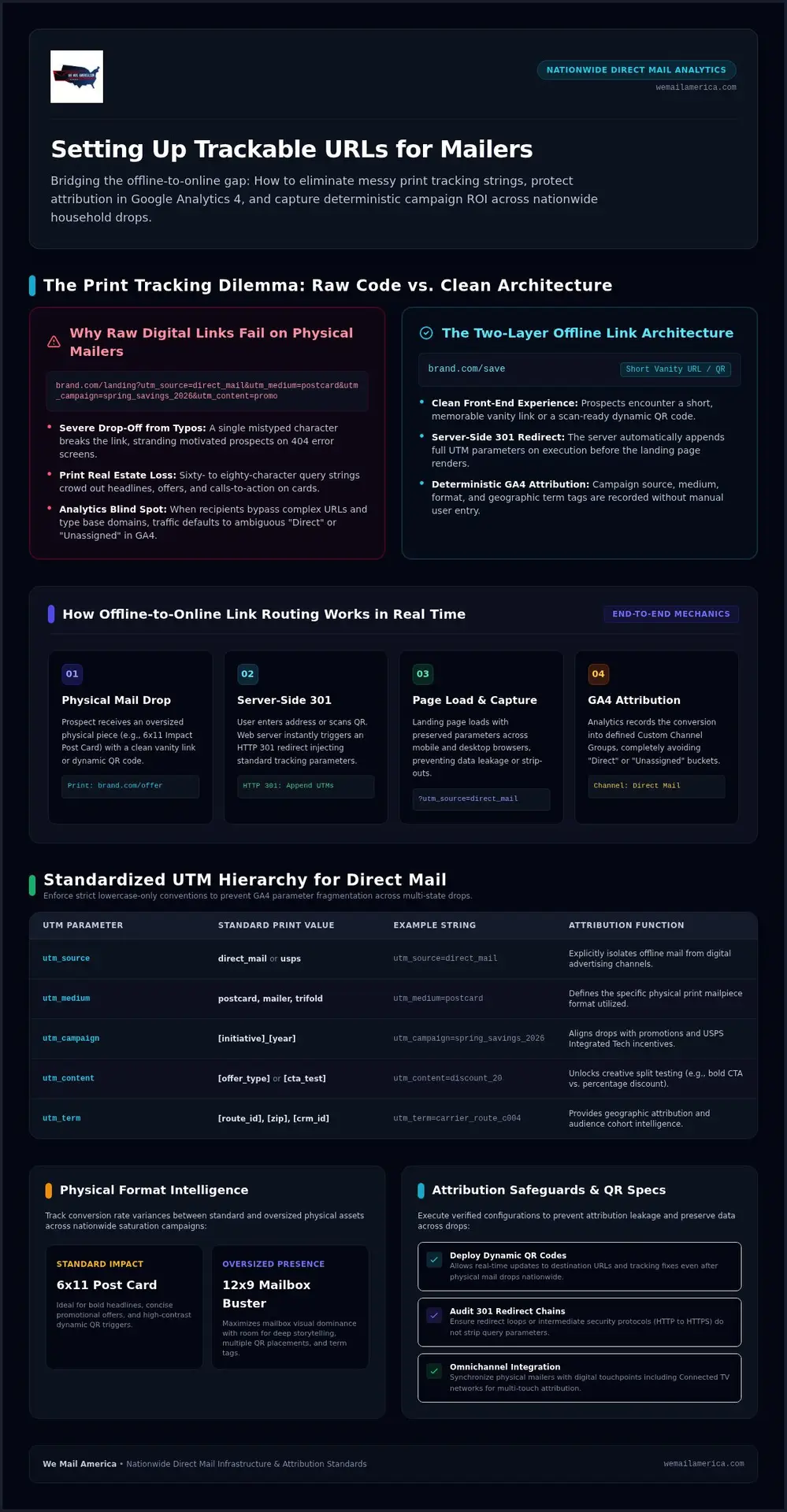
Physical mail pieces don’t come with clickable text. When a prospect pulls an oversized postcard from their mailbox, they must manually enter an address or scan a printed code. If you send that prospect to a basic homepage URL, your analytics engine will record them as direct, unassigned traffic. Successfully setting up trackable URLs for mailers requires bridging this offline action with digital analytics engines through a two-layer link architecture: a clean front-end vanity link and an engineered backend parameter string.
The Anatomy of an Offline-to-Online Tracking Link
An effective print tracking system separates the visual address from the tracking payload. On the front end, the recipient sees a short, branded vanity link such as brand.com/save. When the user types this address into their browser, an immediate server-side HTTP 301 redirect fires, routing the visitor to your final landing page while automatically appending standard Urchin Tracking Module parameters behind the scenes.
Modern analytics platforms instantly capture these appended query strings during the initial page load. The server preserves the campaign source, medium, and creative details without forcing the user to view or manage the technical code. Modern multi-touch campaigns apply this exact mechanic to both typed vanity URLs and scannable QR codes, ensuring every offline interaction carries deterministic attribution directly into your digital reporting dashboard.
Why Raw Digital Links Fail on Physical Postcards
Digital marketing teams often make the mistake of copying full digital campaign links straight onto physical print designs. Printing an eighty-character string packed with symbols, equal signs, and campaign tags creates severe usability issues:
- Severe drop-off from typos: A single mistyped character breaks the link entirely, sending motivated prospects to an error screen.
- Visual design clutter: Complex tracking strings crowd out critical marketing copy and degrade professional brand presentation.
- Print real estate loss: High-visibility formats like a 6×11 Impact Post Card rely on bold headlines, strong offers, and prominent calls to action. Wasting valuable card space on raw code distracts the reader.
Tangible mailers demand clarity. Mastering the setup of trackable URLs for mailers ensures your design remains clean and engaging while your backend attribution stays airtight across every household drop.
Designing a Standardized UTM Parameter Hierarchy for Print Campaigns
Clean analytics reporting requires absolute discipline. When setting up trackable URLs for mailers across national campaigns, inconsistent naming conventions quickly fracture your data. Google Analytics treats uppercase and lowercase characters as separate entities, meaning “Postcard” and “postcard” appear as distinct mediums. Establishing strict, lowercase-only standards ensures your team tracks multi-state saturation and targeted drops without messy data fragmentation.
Core UTM Parameters Adapted for Direct Mail Attribution
Digital-first parameters need slight recalibration for print mailpieces. Set utm_source to an explicit label like direct_mail or usps to clearly separate offline drops from digital ad channels. Define utm_medium by your specific print format, such as postcard, mailer, or trifold. For utm_campaign, combine the initiative title with the delivery year, such as spring_savings_2026. Aligning these tags with official USPS Integrated Technology Promotion specifications also positions your campaign for postage incentives when using compliant mobile triggers.
Utilizing Campaign Content and Term Tags for Granular Testing
Secondary parameters unlock deeper operational intelligence across your print runs. Use utm_content to test creative variables, comparing a bold call-to-action against a promotional percentage discount. Deploy utm_term to capture granular tracking data, such as individual postal routes, targeted zip codes, or CRM list IDs.
- Format verification: Differentiate traffic between an oversized 12×9 Mailbox Buster Post Card and a standard 6×11 Impact Post Card.
- Geographic attribution: Isolate conversion rate variances across different delivery regions nationwide.
- Centralized registry: Maintain an internal parameter spreadsheet to ensure every marketing stakeholder logs links before press production.
Precision tracking turns physical mail into a fully accountable growth channel. If you want turnkey support executing coordinated print campaigns across all 50 states, connect with our campaign specialists to align your tracking architecture before your next drop.
Step-by-Step Guide: How to Configure Print-Ready Tracking URLs and QR Codes
Bridging physical mail with digital analytics shouldn’t require complex software development. By following a proven four-step technical sequence, your team can deploy clean, highly readable vanity links that protect attribution accuracy across national household drops. Setting up trackable URLs for mailers comes down to executing this streamlined workflow before approving final press proofs.
Step 1 & 2: Building Full Destination URLs and Setting Up Vanity Redirects
Start by assembling your target URL inside Google’s Campaign URL Builder or your analytics platform. Attach your structured parameters, combining your core source, medium, and campaign tags into one comprehensive destination link, such as brand.com/landing?utm_source=direct_mail&utm_medium=postcard&utm_campaign=spring2026.
Next, configure your user-facing vanity link. Secure a short branded domain or establish an intuitive subdirectory on your existing site, such as brand.com/save. Create a server-side HTTP 301 redirect within your DNS manager or CMS settings. When a recipient enters that clean phrase, the server immediately forwards them to the tagged destination link while preserving the full query string. Always verify that an active SSL certificate covers the vanity domain so users don’t encounter security warnings on their mobile devices.
Step 3 & 4: Pairing URLs with Scannable QR Codes and Pre-Flight Testing
Modern mailers capture maximum response by pairing typed vanity addresses with dynamic QR codes. Generate vector-based dynamic codes (.EPS or .SVG) saved at 300 DPI to avoid print blurriness. ISO standards require an unprinted quiet margin of at least four modules around the perimeter, and printing the code at least 0.8 inches square ensures instant recognition by smartphone cameras.
- Isolate the touchpoint: Append
utm_content=qr_codeto your QR destination andutm_content=vanity_urlto your printed text link to track which method drives more traffic. - Optimize mobile landing pages: Confirm your destination page loads in under two seconds and features large, tap-friendly buttons.
- Run rigorous pre-flight audits: Scan physical test proofs using iOS and Android devices, and manually type vanity links into desktop browsers before starting full production.
This disciplined process eliminates technical surprises. Setting up trackable URLs for mailers with dual response channels gives every recipient a frictionless path from their mailbox straight to your checkout page.
Overcoming Common Direct Mail Attribution Pitfalls and Data Leakage
Even the most meticulously planned print campaigns can suffer from data leakage. A sudden spike in direct or unassigned web traffic during your postal in-home delivery window is an unmistakable symptom: recipients are reacting to your postcards, but your analytics software isn’t capturing the source. Successfully setting up trackable URLs for mailers requires eliminating server errors and accounting for offline consumer habits that cause conversions to slip through the cracks.
Preventing Parameter Loss During Server-Side Redirects
Technical handshakes between servers frequently strip UTM tags. If your vanity URL redirects from HTTP to HTTPS, then forwards from non-www to www, and finally resolves a trailing slash mismatch, each hop creates an opportunity for parameter loss. A web server configured without query string preservation drops your campaign tags completely, turning a tracked postcard visit into an untraceable direct session.
Audit your server redirects using browser developer tools or URL redirect checkers. Ensure that brand.com/offer forwards directly to the final secure address in a single step while passing all parameters intact. Additionally, confirm that your landing page’s canonical tags don’t instruct analytics scripts to ignore active campaign parameters during session initiation.
Capturing the Halo Effect: Measuring Organic and Direct Search Lift
Human behavior creates an attribution gap that links alone cannot solve. Many recipients glance at a physical mailer, walk over to their laptop, and simply search your company name on Google instead of typing the vanity URL. This print-induced lift gets miscredited to organic search or paid search brand campaigns.
- Establish pre-drop search baselines: Measure your normal branded search impressions and direct site traffic for three weeks prior to your delivery window to quantify the offline lift.
- Print campaign-exclusive promo codes: Feature unique checkout codes on your mailers. When a customer bypasses your vanity link and visits via search, their applied coupon code ties the sale back to print.
- Deploy dedicated call tracking numbers: Include dynamic or unique forwarding phone numbers on the physical piece to track offline inbound calls accurately.
Closing these tracking gaps proves the true bottom-line return of your direct marketing investment. To eliminate attribution guesswork and launch fully coordinated campaigns nationwide, start your direct mail campaign with our experienced team today.
Scaling Results: Integrating Trackable Print Mailers with Omnichannel Campaigns
Direct mail produces exceptional standalone response rates, but isolating print from your digital ecosystem limits its full potential. Setting up trackable URLs for mailers does more than record visits; it transforms offline recipients into prime candidates for high-intent digital retargeting. Coordinating tangible print with synchronized digital outreach creates compound momentum across your entire marketing funnel.
Coordinating Physical Postcards with Digital Retargeting and CTV
When a prospect scans a QR code or types your vanity address, their initial site visit acts as an immediate trigger. Firing audience retargeting pixels upon landing lets you deliver follow-up digital display ads while your print offer remains fresh on their kitchen counter.
Modern campaigns synchronize mail in-home delivery dates with geographic digital delivery. Aligning your postcard drop with targeted streaming commercials via Connected TV Network campaigns reinforces brand credibility on the living room screen. Multi-touch attribution models show that consumers exposed to both a tangible mailpiece and a synchronized video impression convert at substantially higher rates than those reached through a single channel alone.
Partnering for Turnkey National Direct Mail Execution
Managing the mechanics of print production alongside digital tracking demands reliable execution. Oversized print formats provide the physical real estate required to feature legible vanity domains and scan-ready QR codes without sacrificing conversion-focused sales copy. High-impact selections like the 6×11 Impact Post Card, 10×17 Sizeable Trifold, and 12×9 Mailbox Buster Post Card capture immediate attention in cluttered residential mailboxes.
- Turnkey operational delivery: Coordinate targeting, printing, postal logistics, and digital integration under one roof.
- Nationwide consistency: Execute standardized tracking taxonomies across saturation and targeted mailings reaching households across all 50 states.
- Cross-channel harmony: Connect physical print pieces directly to programmatic display, Connected TV, and mobile messaging for seamless multi-touch tracking.
Setting up trackable URLs for mailers ensures complete visibility from the initial postal scan to final checkout. When you are ready to scale your print marketing with proven American-made production and airtight analytics, connect with our national team through the We Mail America inquiry form to schedule your campaign rollout.
Turn Print Mailbox Impact into Measurable Digital Growth
Direct mail cuts through daily screen fatigue and puts your brand directly into consumer hands. Mastering the technical details of setting up trackable URLs for mailers bridges that physical touchpoint with your digital analytics, turning tangible postcard engagement into clear, actionable GA4 metrics. Pairing crisp vanity domains with server-side 301 redirects and high-resolution dynamic QR codes protects your attribution data from leakage and eliminates reporting guesswork.
Coordinating physical mailpieces with synchronized touchpoints like Connected TV creates compound momentum across every target audience. At We Mail America, we provide turnkey campaign execution across all 50 states, specializing in high-visibility formats like our 6×11 Impact Post Cards and oversized mailers engineered for bold calls to action. Take control of your offline attribution and drive measurable growth. Plan your next high-impact nationwide direct mail campaign with We Mail America today and prove the bottom-line value of physical marketing with complete confidence.
Frequently Asked Questions
What is the ideal length for a trackable URL printed on a direct mailer?
Keep your printed vanity URL under 15 to 20 total characters, including the root domain. A concise slug such as brand.com/save or brand.com/go eliminates typing fatigue and limits user error on mobile keyboards. Avoid hyphens, numbers, or mixed capital letters that confuse readers. If an address requires more than two brief words after the forward slash, it is too long for effective print response.
How do dynamic QR codes differ from printed vanity URLs for tracking mailers?
Printed vanity URLs require manual entry into a browser, while dynamic QR codes trigger instant smartphone camera scanning. Dynamic codes route visitors through an intermediate server, giving you the flexibility to update destination landing pages or UTM tags even after pieces drop in the mail. When setting up trackable URLs for mailers, offering both methods on formats like oversized postcards accommodates user preferences and maximizes total scan-and-type responses.
Can I track direct mail responses in Google Analytics 4 without third-party software?
Yes. You can track direct mail completely within Google Analytics 4 by pairing server-side 301 redirects with standard UTM parameters. Because GA4 does not include “Print” or “Direct Mail” in its default channel grouping, custom medium tags like utm_medium=postcard initially appear under Unassigned traffic. You simply need to build a Custom Channel Group in GA4 Admin to isolate direct mail traffic into its own dedicated acquisition dashboard.
What happens if a recipient searches my company name instead of typing the mailer URL?
When a recipient bypasses your printed link and searches your brand on Google, analytics software attributes that visit to organic search or paid search. This attribution leakage hides the true impact of your print drop. To capture these conversions, print exclusive promotional discount codes on the mailpiece and track baseline organic traffic lift across targeted zip codes during your in-home delivery window.
How do 301 redirects preserve UTM tracking parameters from a vanity domain?
A server-side HTTP 301 redirect automatically forwards the visitor from an easy-to-type address to your full destination URL while appending your campaign query string. Proper web server configurations pass these UTM tags through the redirect without dropping parameters. This handoff happens in milliseconds before the page renders, allowing GA4 to capture the original source and campaign metadata without exposing users to long, cluttered tracking code.
Why do some tracking URLs show up as direct or unassigned traffic in GA4?
Tracking URLs drop into “Direct” or “Unassigned” traffic when server redirect chains strip incoming UTM parameters before the landing page loads. Client-side JavaScript redirects, insecure HTTP-to-HTTPS hops, and trailing slash discrepancies frequently wipe query strings. Additionally, because GA4 lacks a native “Direct Mail” channel rule, sessions tagged with custom mediums automatically categorize as Unassigned until you define custom channel grouping rules inside your property settings.
Should I use a separate unique URL for each zip code in a nationwide mailing campaign?
Printing completely different domain names for every zip code creates administrative headaches. Instead, maintain a single memorable vanity domain for typed entry and leverage variable data printing on dynamic QR codes to assign zip-specific utm_term parameters. When setting up trackable URLs for mailers across all 50 states, this approach keeps your brand presentation clean while delivering precise geographic attribution across every targeted postal route.